Every social media team eventually hits the same wall. It is not a content problem. It is a permissions problem. Someone junior posts something they should not have. A senior hire cannot get anything approved because the founder is the only one with login access. A client's brand goes quiet for three days because the one person who could publish was traveling. None of these are content failures. They are structure failures, and they all trace back to the same root cause: nobody defined who is allowed to do what.
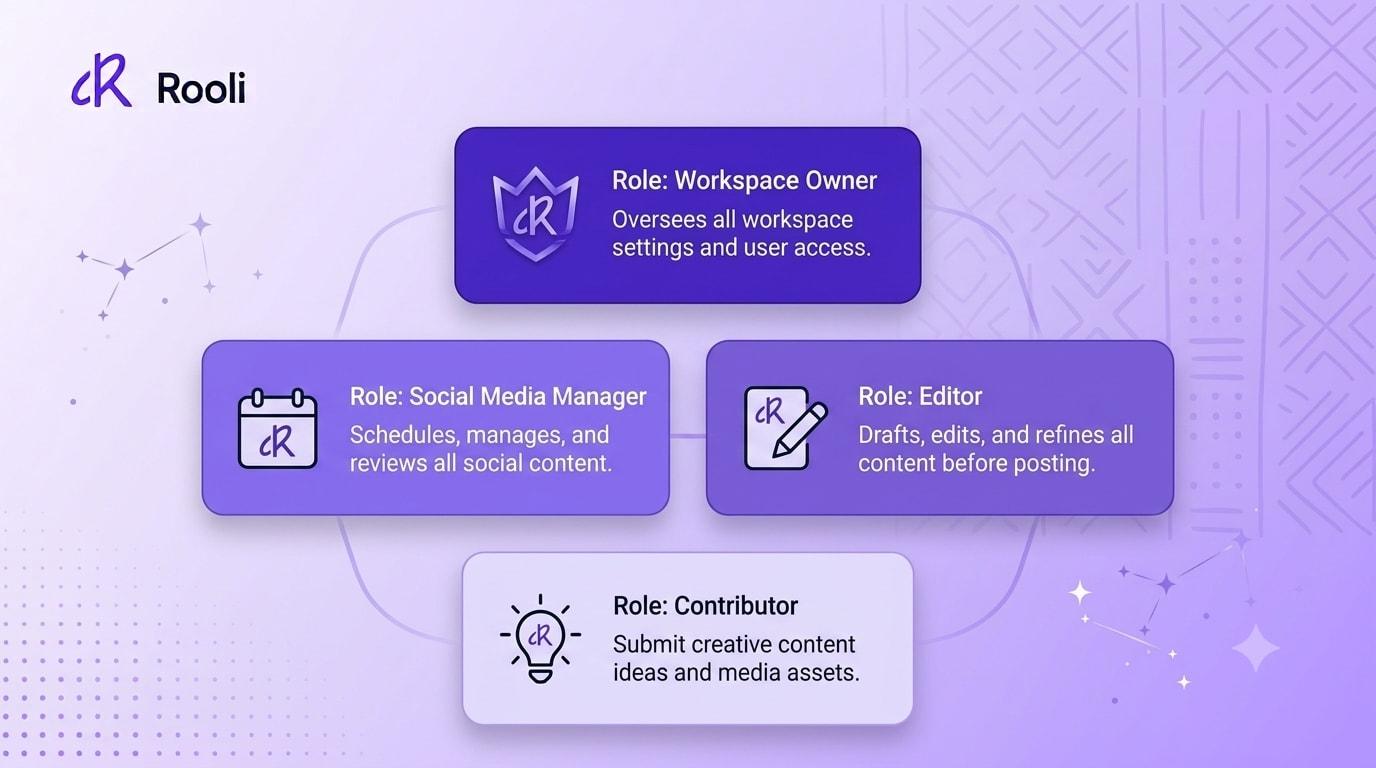
This guide breaks down how to think about social media team roles, the mistakes most teams make when they skip this step, and exactly how the four active roles on Rooli, Workspace Owner, Social Media Manager, Editor, and Contributor, map onto real team situations you are probably living through right now.
Why Social Media Team Structure Matters More Than People Think
When a team is small, one or two people, structure feels unnecessary. You both have access to everything, you both know what is going on, and adding roles feels like bureaucracy for its own sake. The trouble starts the moment a team grows past that point. A third person joins, then a fourth, and suddenly everyone has full access to everything: every client account, every draft, every publish button. Nobody agreed to this. It just happened, because nobody set boundaries early.
The cost shows up later, and it shows up expensive. A junior team member publishes a post that was still in draft. A freelancer with full access leaves the team and nobody remembers to revoke their login. A client asks who approved a post and the honest answer is nobody knows, because everyone could approve everything and no one did formally. Clear roles are not about limiting your team. They are about making sure the right person is doing the right job, and the wrong post never goes out because access was never structured in the first place.
The Four Roles Every Growing Team Needs
Rooli's Team Management currently supports four active roles: Workspace Owner, Social Media Manager, Editor, and Contributor. Each one maps to a real stage of trust and responsibility. Here is what each role actually does, and who should be wearing it.
Workspace Owner: The Final Word
The Workspace Owner has full control of the workspace and is never gated by approvals. They create, edit, delete, and publish posts directly. They approve or reject any post submitted for review, and they are the only role that can approve or reject posts sent to any team member's queue, not just their own. They manage workspace settings, members, and roles, connect and disconnect social accounts, and view analytics and billing.
This role belongs to the founder, the agency lead, or whoever is ultimately accountable for what goes out under the brand's name. In most small teams there is exactly one Workspace Owner. In an agency managing multiple client workspaces, each workspace typically has its own Owner, often the account lead for that client.
Editor: The Senior Reviewer
Editors create, edit, delete, and schedule content, and they approve and reject posts submitted by SMM & Contributors. In strict mode, an Editor's own posts also require approval, which suits teams that want a second set of eyes on everything, including senior output.
This role fits a senior content lead, a second in command, or someone trusted enough to review other people's work but not necessarily the final voice on brand strategy. Agencies often use this role for a client's internal marketing lead who wants sign off power without full workspace control.
Social Media Manager: The Engine Room
A Social Media Manager creates, schedules, and publishes content without needing approval, and they approve posts submitted by Contributors. When something feels like it needs another opinion before it goes out, they can request a second opinion by sending a post for approval rather than publishing alone. This role carries real trust and real speed.
This is the role for your lead SMM, the person running day to day content for a brand or a client roster. They should not need to wait on anyone for routine posts, but they still have the option to loop someone in when a post feels higher stakes than usual.
Contributor: The Safest Way to Grow a Team
Contributors write, edit, and schedule posts, and they submit them for approval, choosing their reviewer at the point of submission. They can see the status and feedback on their own work, view analytics, & manage the inbox. What they cannot do is just as important as what they can: they cannot publish without approval, cannot approve or reject anyone else's posts, and cannot delete posts.
This is the role for interns, new hires, freelancers you are still building trust with, or anyone doing their first few weeks of work on a brand. A Contributor can do genuinely useful work from day one without any risk of something going live by accident.
PRO TIP
Start every new hire as a Contributor, even if they come in with years of experience elsewhere. The role protects the brand while they learn your specific voice and your client's expectations. Promote them to Editor or Social Media Manager once they have proven it, which takes seconds inside Team Management.
Matching Roles to Real Team Situations
The solo social media manager taking on their first hire
You have been doing everything yourself and you are finally bringing someone in. Make them a Contributor. They draft and schedule, you approve. You get real help without giving up the final say on anything that carries your name.
The small business with one in house marketer
If you are a business owner who wants visibility without doing the daily work, you are the Workspace Owner, and your marketer is a Social Media Manager. They run daily posting without needing your sign off on routine content, but you retain the ability to step in, review analytics, and manage the account whenever you need to.
The agency running multiple client brands
Each client typically gets its own workspace. Your account lead is the Workspace Owner for that client. Your senior strategist might sit as Editor across several client workspaces, reviewing junior work before it reaches the client's own approval step. Your junior staff and interns are Contributors everywhere until they have earned more.
The creator building a small team around their personal brand
You stay Workspace Owner, full stop, because this is your name and your face. A part time assistant or a scheduling helper comes in as a Contributor, drafting and organizing content for your review, never publishing on your behalf without you seeing it first.
Common Mistakes Teams Make Without Defined Roles
The first mistake is giving everyone the same access because it feels simpler. It is simpler for exactly one day, the day you set it up. Every day after that, it is a liability, because there is no way to tell who should be doing what, and no way to stop someone from doing something they should not.
The second mistake is never revisiting roles as people grow. Someone who started as a Contributor six months ago and has since become your most reliable hand is still stuck submitting everything for approval, which slows the whole team down and frustrates the person who has clearly earned more trust.
The third mistake is treating role assignment as a one time task instead of an ongoing practice. Teams change. Freelancers come and go. Client relationships shift. Revisiting who holds which role every few months, especially before a busy season or a new client launch, keeps the structure matching the reality of the team.
PRO TIP
Set a recurring reminder to review your team's roles every quarter. It takes five minutes and it catches the freelancer who left three months ago but still technically has access, along with the intern who has quietly become indispensable and deserves a promotion inside the workspace.
How to Set Up Roles on Rooli
From your Rooli dashboard, go to Workspace, then Team. From there you can invite a new member by email and assign their role at the point of invitation, or add someone who already has a Rooli account directly to the workspace. The Roles and Permissions tab breaks down exactly what each role can and cannot do, so there is no guessing before you assign anyone. Roles can be changed at any time as your team and your trust in them grows.
Team roles are included on the Business plan, which covers 3 users, and on the Rocket plan, which supports unlimited users for larger agencies.
Frequently Asked Questions
What are the main social media team roles?
On Rooli, the four active roles are Workspace Owner, Social Media Manager, Editor, and Contributor. Each carries a different level of publishing power and approval authority, from full control down to draft and submit only.
Who should be the Workspace Owner?
Whoever is ultimately accountable for the brand. That is usually the founder, the business owner, or the agency's account lead for that specific client workspace.
Can a Contributor publish posts on their own?
No. Contributors can write, edit, and schedule posts, but every post they create must be submitted for approval and reviewed by a Social Media Manager, an Editor, or the Workspace Owner before it goes live.
What is the difference between an Editor and a Social Media Manager?
Both can approve Contributor posts, and both can publish their own content. The key difference is that an Editor can also be placed under approval themselves in strict mode, which suits teams who want senior content reviewed too, while a Social Media Manager publishes freely and simply has the option to request a second opinion when they want one.
How many people should be Workspace Owners on one team?
Usually just one per workspace. Having a single clear owner avoids confusion about who has final say, especially when a post needs a fast decision.
Should I change someone's role once they have proven themselves?
Yes. Roles are not meant to be permanent labels. Promote a Contributor to Editor or Social Media Manager once they have shown they understand the brand voice and can be trusted with more. It takes seconds inside Team Management.
Can agencies use different roles across different client workspaces?
Yes. Each client workspace on Rooli has its own team and its own role assignments, so the same staff member can hold different levels of access on different client accounts depending on the relationship and the trust built with each one.
Coming Next
Next in this series: How Agencies Manage Client Post Approvals Without the Back and Forth, a closer look at replacing scattered WhatsApp threads with one clear approval trail per client.
rooli.co • AI-Powered Social Media Management Built for Africa