
You can now connect your LinkedIn account to Rooli and schedule posts for every brand you manage, from one dashboard, with pricing in naira.
LinkedIn scheduling is officially live on Rooli. Here is what it does, why it matters for social media managers across Africa, and how to set it up in minutes.
LinkedIn scheduling is now live on Rooli
For a long time, scheduling LinkedIn content properly meant paying for a foreign tool, in dollars, that was never really built for how businesses here work. As of this launch, that changes. Rooli now supports connecting LinkedIn alongside the platforms it already handles, so you can plan, write, and schedule across all of them in one place.
Rooli now supports scheduling for:
LinkedIn
X (Twitter)
Facebook
Instagram
TikTok
If you manage social media for clients or for your own brand, you can keep every account in a single dashboard instead of jumping between apps and tabs all day.
Why this matters for Nigerian and African SMMs
Most popular LinkedIn schedulers were designed for a different market. That shows up in three ways that cost local social media managers real time and money.
The dollar tax. Foreign tools bill in dollars, so your subscription quietly rises every time the exchange rate moves, even when the software has not changed. Rooli is priced in naira, so the price you see is the price you pay.
Multiple clients, one workflow. Tools built for a single company posting for itself struggle when you are running five or more client brands at once. Rooli is built for exactly that, with one dashboard across all your accounts.
Your brand voice. Generic AI caption tools are trained mostly on American English, so brands end up sounding foreign. Rooli writes captions in each brand's real voice, so a Lagos brand sounds like a Lagos brand.
How to connect your LinkedIn account to Rooli
Connecting takes a couple of minutes. (Confirm these steps match your live product flow before publishing.)
1. Sign in to your Rooli account, or create one to start your free trial.
2. Open the Social Account tab of your dashboard.

Social Accounts
3. Select Connect LinkedIn.
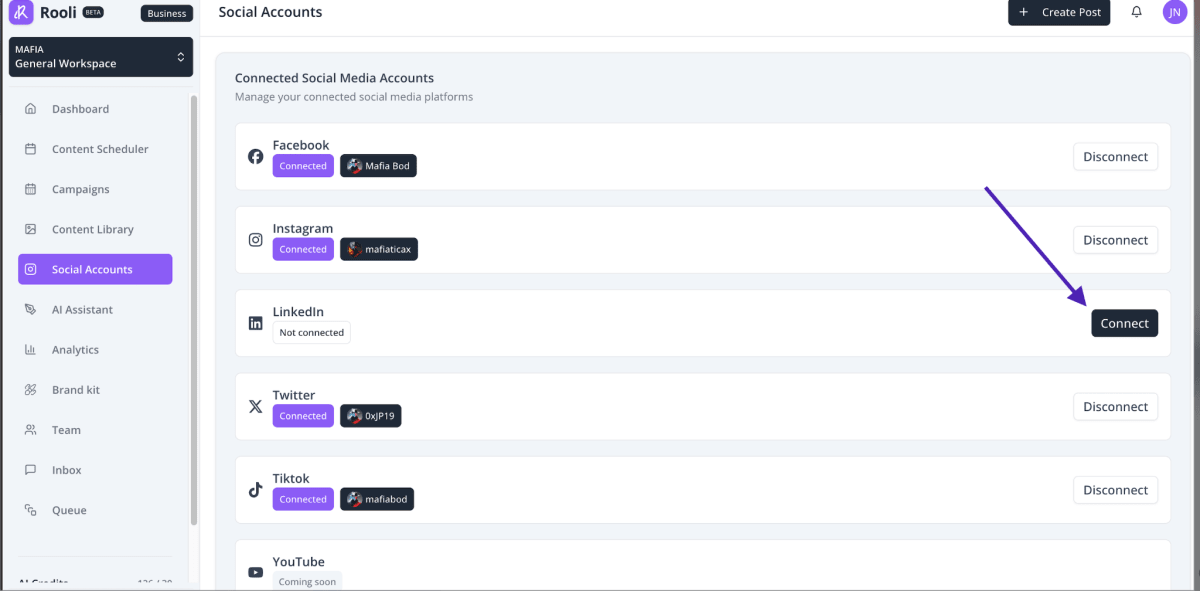
Connect Linkedin
4. Authorize Rooli when LinkedIn asks for permission.

Authorise Linkedin
5. Your LinkedIn account now appears in your dashboard, ready to schedule.
NB: Rooli can connect to both personal profile and linkedin pages - a lot of options for!
That connection step is the single most important thing to do first. Once an account is connected, everything else in Rooli opens up.
How to schedule your first LinkedIn post
1. From your dashboard, start a Creat post and select your connected LinkedIn account.
2. Write your caption, or generate one in your brand's voice and edit it to taste.
3. Pick the date and time you want it to go live.
4. Schedule it. Rooli posts it automatically at the time you set.
You can repeat this for a full week of content in one sitting, across LinkedIn and every other platform you manage, then get back to the rest of your work.
What you can do once LinkedIn is connected
Schedule LinkedIn posts in advance, individually or in batches.
Manage LinkedIn alongside X, Facebook, Instagram, and TikTok from one place.
Generate captions tuned to each brand's voice instead of a generic template.
Run multiple client accounts without switching tools.
Pricing
Rooli starts with a 14-day free trial with full access. After the trial, you choose a plan to keep your accounts connected and your posts scheduled.
Business: ₦17,640 per month
Rocket: ₦72,030 per month, built for agencies and people managing many brands
Compared with foreign schedulers that bill in dollars, the difference once the exchange rate is applied is significant, and you are paying for a tool built for your market.
Built for Africa
Getting this access was not quick. We began the approval process and worked through stage after stage to be able to offer LinkedIn scheduling from a platform built here. We did it because every social media manager we spoke to deserved the same tools as anyone else, without the dollar tax and without bending their work to fit software made for another market.
LinkedIn scheduling on Rooli is for the social media managers and businesses across Africa who were told to make do. You no longer have to.
Frequently asked questions
Can I schedule LinkedIn posts with Rooli? Yes. You can connect your LinkedIn account to Rooli and schedule posts in advance, on their own or in batches, from one dashboard.
Can I schedule for more than one LinkedIn account? Yes. Rooli is built for people managing multiple brands and clients, so you can connect and schedule for several accounts in one place.
How much does it cost to schedule LinkedIn posts on Rooli? Rooli starts with a 14-day free trial. After that, the Business plan is ₦17,640 per month and the Rocket plan is ₦72,030 per month.
What other platforms does Rooli support? Rooli supports LinkedIn, X, Facebook, Instagram, and TikTok from a single dashboard.
Is Rooli only for Nigeria? Rooli is built for Nigerian and African businesses, with pricing in naira and captions tuned to how brands here actually speak.
Start scheduling LinkedIn posts today
LinkedIn scheduling is live on Rooli now. Connect your account, schedule your first post in minutes, and run all your platforms from one dashboard, priced in naira.
Start your free trial at rooli.co.